
AI Girlfriend Video Maker for Your Character Watch Her Move

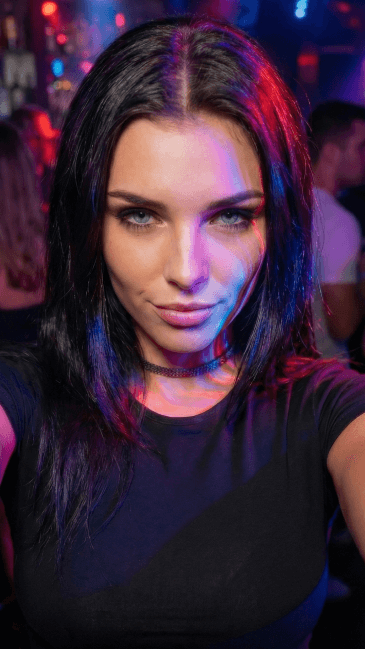
Free to try. No credit card required.
How the AI Girlfriend Video Maker Actually Works
Most apps that mention an ai girlfriend video maker are really just talking about static photo sets dressed up as motion. BeCraved actually generates a video, a short clip with real movement, not a still image with a filter slapped on top. As text-to-video models have improved across the industry, turning a sentence into motion has gotten a lot more practical, and that's exactly what happens here.
- Text-to-video starts from a scene description: type something like 'she's laughing on a porch swing at golden hour' and BeCraved builds the motion from that description.
- Image-to-video takes a photo, whether it's one you generated in-app or an image you already had, and adds motion so it plays instead of sitting flat.
- Every clip has a credit cost, using the same credits you already spend on photos and voice calls, so there's no separate video plan to buy.
- You choose 5, 10, or 15 second clips depending on how much the scene needs, which keeps every clip short and on purpose.
Whether you start from words or an image you already made, setup takes seconds and the credit cost is shown before you confirm. As far as AI video generation goes, that's about as simple as it gets. Check out AI photo generation if you want the perfect image first, then turn it into a clip after.
Keeping Her Face and Style Consistent, Clip After Clip
A video maker only matters if your character actually looks like herself in the result. This kind of generative AI work depends on how well the system holds onto details, so BeCraved pays close attention to keeping her consistent whether she's drawn in anime style or a more realistic look.
- Face consistency matters most in short clips, since even a few seconds of drift is obvious; BeCraved keeps her features stable through the whole clip.
- Character consistency carries over from the version of her you already chat with, so the video actually matches the character you know, not a stranger wearing her face.
- Camera movement adds cues like a slow pan or a subtle zoom, giving even a 5 second clip a sense of depth instead of feeling flat.
- Video quality depends partly on your input: a clear reference photo or a detailed scene description gives the animation more to work with.
None of this needs editing skills on your part. You describe the scene or pick the image, and BeCraved handles motion and framing from there. If you haven't shaped her look yet, start on the create your AI girlfriend page first.
Downloading, Sharing, and Keeping Your Clips Private
Once a clip finishes, it's yours to keep. BeCraved lets you download your short clips and decide what happens to them next, whether that means saving them privately or sharing them wherever you want. This includes uncensored video for subscribers who want scenes beyond the SFW defaults.
- Download options mean the clip lives on your device, not stuck inside a feed you have to dig through to find it again later.
- Sharing is entirely up to you; BeCraved doesn't post your clips anywhere or push them into any kind of public feed.
- Uncensored video is available for subscribers, so text-to-video and image-to-video both work for NSFW scenes too, not just SFW ones.
- Privacy stays tied to your account and what you create; there's no public gallery showing your generated clips to strangers.
As apps like Replika have shown, trust and privacy matter a lot in this space, and BeCraved treats your clips the same way. Explore AI girlfriend chat to build the relationship that gives your videos context in the first place.

Written by
James Foster
James Foster covers the culture around AI companionship for BeCraved — the trends, the honest comparisons, and why more people are turning to AI partners.
Last updated 2026-07-01
Meet Someone New
AI companionsEverything You Get
Available nowText-to-Video
Type a scene description and BeCraved animates it into a short clip, no drawing or editing needed.
Image-to-Video
Animate a photo you already generated or uploaded, turning a still picture into a clip with real motion.
Style & Consistency
Works with anime style or realistic looks while keeping face and character consistency across every clip.
Private by Default
Download your clips and keep them to yourself; nothing gets shared or posted without you choosing to.
Frequently Asked Questions
5 questionsExplore More
AI Photo Generation
Create the perfect image of your character before turning it into a video.
Create Your AI Girlfriend
Design her look and personality before you start animating her.
AI Girlfriend Chat
Build the relationship that gives your videos and photos real context.
AI Voice Call
Hear her voice with paid voice calls alongside your video clips.
AI Girlfriend Video Generator
Learn about this feature
AI Video Girlfriend
Learn about this feature
Image to Video AI Girlfriend
Learn about this feature
Create AI Girlfriend Video
Learn about this feature
NSFW AI Video Generator
Learn about this feature
Start Making Videos of Your AI Girlfriend
Sign up free to chat first, no credit card needed, then use credits to turn your favorite scenes into short clips.
Try Free